API Token Keeps Expiring? Fix the Refresh Process
Find why a connection works at first, then stops. Separate a normal access-token expiry from a failed refresh, revoked access or an app still set to testing.
Reconnecting an app every morning is a clue, not a lasting fix. Many APIs use a short-lived access token: a temporary pass that expires by design. An authorised app can often get a new one with a refresh token. If that process fails, bookings and updates may stop until someone signs in again. Not every API uses this system, so first check which access method your vendor supports.
Things to check first
- Record the error code and when it starts. Does the connection fail after an hour, after a week or after a password or permission change? Share the error text, never the token itself.
- Check whether the app has permission to refresh access and where it stores the latest credentials. If the provider returns a replacement refresh token, the app must handle it according to that provider's rules.
- For Google connections, check the OAuth app's audience and publishing status. Google documents a seven-day refresh-token limit for external apps in Testing, with limited exceptions for basic profile scopes. This does not apply to every API.
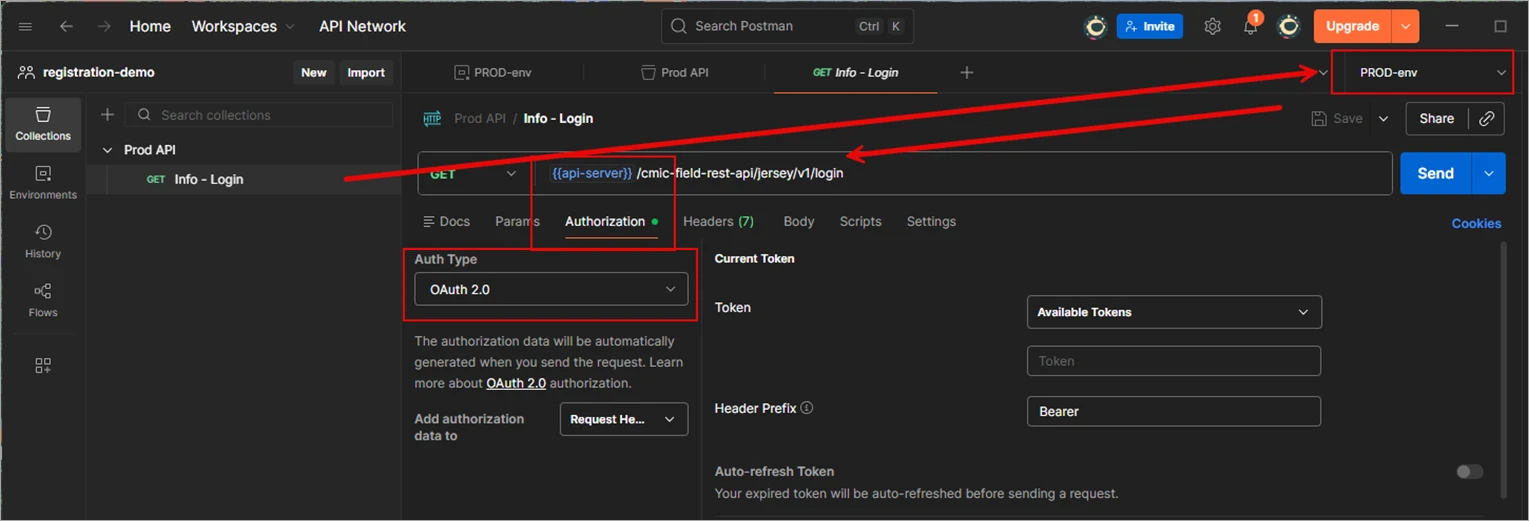
OAuth settings in a Postman example from CMiC. Your vendor may use a different access method. Never put real access tokens or keys into a screenshot or freelancer brief.
Screenshot: CMiC Postman guide. Example screen; yours may look different.What to ask the freelancer to do
- Identify the access and refresh method
- Fix token storage and refresh handling
- Test expiry, revocation and concurrent jobs
- Document reconnect alerts and waiting work
Questions to ask before hiring
- Is this an access-token expiry or a refresh-token failure?
- Who owns the app registration and reconnect process?
- What happens to waiting bookings when access is revoked?
Red flags
- Asks you to paste tokens into a public brief
- Promises permanent access with no chance of revocation
- Retries invalid credentials forever without alerting anyone
Agree what the job includes
- Identify the access method before changing it. Cliniko, for example, documents API keys rather than this OAuth refresh flow. Do not add OAuth code to a key-based connection just because both produce an access error.
- Follow the provider's refresh rules and store secrets on the server. Agree how several jobs share refreshed access without replacing new credentials with old ones. Logs should record the error and affected account without recording tokens.
- Test ordinary access expiry, revoked permission and a failed refresh service. If access must be granted again, show an owner a clear reconnect task. Keep failed booking work waiting safely; do not report it as completed just because the refresh step was skipped.
What to send the freelancer
- Send the vendor name, access method, redacted error and failure schedule. Include recent password, app-status and permission changes.
- List the servers and workflow tools using this connection. Confirm who owns the app registration and who can reconnect the business account.
- Agree a test account and access limits. Use a secure credential store or account invitation rather than placing secrets in the freelancer brief.
How to check the work is done
- A request made after normal access expiry gets valid access and completes once, without a manual reconnect.
- Revoked access produces a clear alert and reconnect path. A temporary refresh failure leaves work recoverable and does not expose secrets.
- Two jobs refreshing together follow the vendor's rules. The handover names the app owner, secret storage and recovery steps.
What may cost extra
- Vendor app review, wider permissions and changes to a customer's organisation policy may need separate work.
- No one can promise a refresh token will last forever. Revocation and vendor policy can still require a new sign-in.
Sources checked 23 October 2026
Use this guide to agree the work and check the result.
Common questions
Why does my Google API connection stop after seven days?
One possible cause is an external OAuth app left in Testing. Google documents a seven-day refresh-token lifetime in that state, except for certain basic profile scopes. Check the actual error and app settings before changing them.
Is an expired token always a coding fault?
No. Access can be revoked, permissions can change or an organisation can apply a policy. A good integration handles ordinary expiry automatically and makes cases needing a new sign-in clear.
Find help on Fiverr
Ready to hand it over? This freelancer offers help with the job covered in this guide. Look at their work and send them your brief to get a quote.
Muhammad Usman
@usmandev786 · FiverrPHP or Python API connection repair
This listing offers PHP and Python API integrations, including Google services. Ask whether your provider’s OAuth refresh flow is supported. The public page does not prove experience with your clinic vendor.
The listing showed 201 reviews when checked. Reviews cover a range of jobs; they do not prove experience with your clinic software.
Before you hire: Request an expiry and revoked-access test, secure token storage and a clear reconnect path. Get the exact repair scope in writing.
View service on Fiverr ↗Listing checked 2026-10-23. We have not hired this freelancer or tested their work.
Build my freelancer brief
Answer a few questions to make a clear job description you can send to a freelancer.