Add Schema Markup That Matches Your Page
Choose useful structured data, keep it true to the visible page and test the code without promising special Google results.
Schema markup is code that labels facts on a page, such as a product’s price or an article’s author. It can help search engines understand that page. It is not a way to invent reviews, add hidden claims or guarantee stars in Google. Start with the page you actually have and the facts visitors can read.
Things to check first
- Pick the page type and check Google’s current rules for the search feature you want. Not every schema type produces a special result.
- Look for markup already added by the theme, CMS or plugins. Avoid adding a second block with conflicting prices or names.
- Compare the proposed fields with the visible page. Check product availability, dates, authors and reviews before adding them.
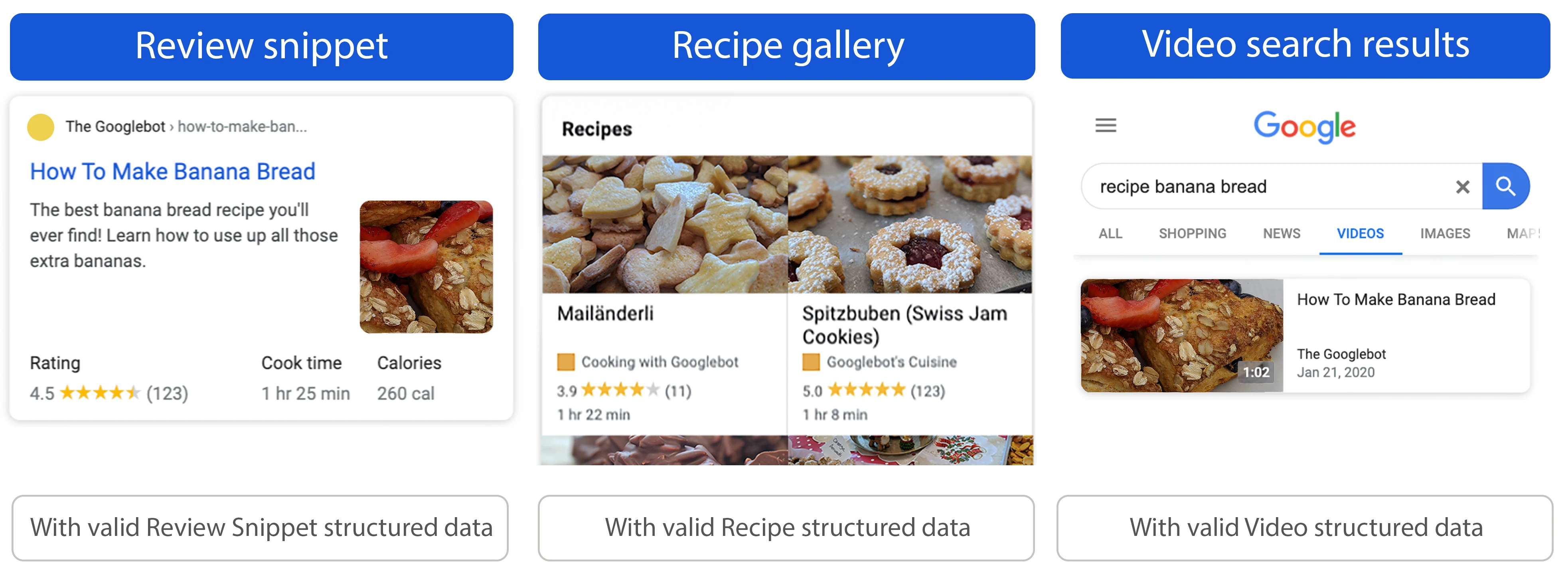
Google’s examples show possible enhanced search results. Adding valid markup does not guarantee any of these displays.
Documentation screenshot: General Structured Data Guidelines | Google Search Central | Documentation | Google for Developers. Example screen; yours may look different.Use facts your page supports
Choose the right type for the real content. Do not mark a service page as a product solely to chase review stars. Reviews must meet the relevant rules; copying a rating from another site is not a shortcut to eligibility.
For changing details such as price or stock, the markup should update with the page. Ask where that data comes from. A pasted code block can become wrong when the business edits the visible content later.
Check the code and the published page
Use Google’s Rich Results Test for supported features and inspect the published HTML. A valid code block may still fail a content rule. The page and relevant images also need to be accessible to Google.
After publication, watch Search Console for reported problems on affected page types. Passing a test does not guarantee that Google will display an enhanced result. Ask for a maintainable setup and clear editing notes rather than a screenshot of stars.
What to ask the freelancer to do
- Choose markup that fits the visible content
- Add the agreed fields to the right templates
- Test the published markup and editing process
Questions to ask before hiring
- Which schema types fit these pages and why?
- How will changing prices or stock update the code?
- Does the quote include implementation or only recommendations?
Red flags
- Guarantees review stars
- Adds ratings the page cannot support
- Installs overlapping plugins without checking their output
Agree what the job includes
- Review existing markup and choose types that match the agreed pages and Google’s supported features.
- Add or repair the code, using live page data where fields change regularly.
- Test representative pages and document how editors keep the markup accurate.
What to send the freelancer
- Share example URLs and the plugin or theme that currently adds markup.
- Supply real product, business or author details and evidence for any review fields.
- Agree which templates and page counts the quote includes.
How to check the work is done
- The markup describes facts visible on the page and contains no invented ratings or hidden claims.
- Agreed page types pass the relevant technical tests, with remaining warnings explained.
- Changing an agreed field updates the markup correctly, or the handover explains the manual step.
What may cost extra
- No seller can guarantee stars, rich results or a ranking increase.
- Rewriting the page and adding every schema type across a large site need separate scope.
Sources checked 2026-10-24
Use this guide to agree the work and check the result.
Common questions
Does valid schema guarantee a rich result?
No. Google checks more than code syntax and decides how a result appears. Eligibility is not a display guarantee.
Can a plugin add all the schema I need?
A plugin may handle common page types. Check its output against your actual content and avoid conflicting code from several tools.
More help: Source 1
Find help on Fiverr
Ready to hand it over? This freelancer offers help with the job covered in this guide. Look at their work and send them your brief to get a quote.
Manav S
@manavsharma909 · FiverrSchema work within a technical SEO package
The higher-scope package lists schema and error fixes. Agree the page types and actual implementation rather than ordering an audit by mistake.
Listing checked October 24, 2026: 454 reviews, 4.9/5 displayed. Reviews cover the full technical SEO gig, not schema alone. Some recent feedback specifically mentioned schema work.
Before you hire: Ask how the code stays aligned with visible page content. No seller can guarantee stars or other enhanced search results.
View service on Fiverr ↗Listing checked 2026-10-24. We have not hired this freelancer or tested their work.
Build my freelancer brief
Answer a few questions to make a clear job description you can send to a freelancer.