 n8n
n8nn8n Workflow Not Working? Checks & Repair Guide
Find out why your n8n automation fails, misses records or adds the same item twice. Check the simple causes before paying for a repair.
An n8n workflow joins a set of steps together. One might take a new enquiry, look up a customer and send a reply. If the reply never arrives, the first useful question is where the information stopped. Each step is called a node. Checking one run from start to finish is usually more useful than changing several nodes at once.
Things to check first
- Open the execution history: this is the list of past runs. Find a failed run and note the first step with an error.
- Check whether the workflow is turned on and the connected app accounts still work. Note any recent password, app or workflow changes.
- Use a made-up record to compare what each step receives with what it sends. Keep real customer messages and payments out of the test.
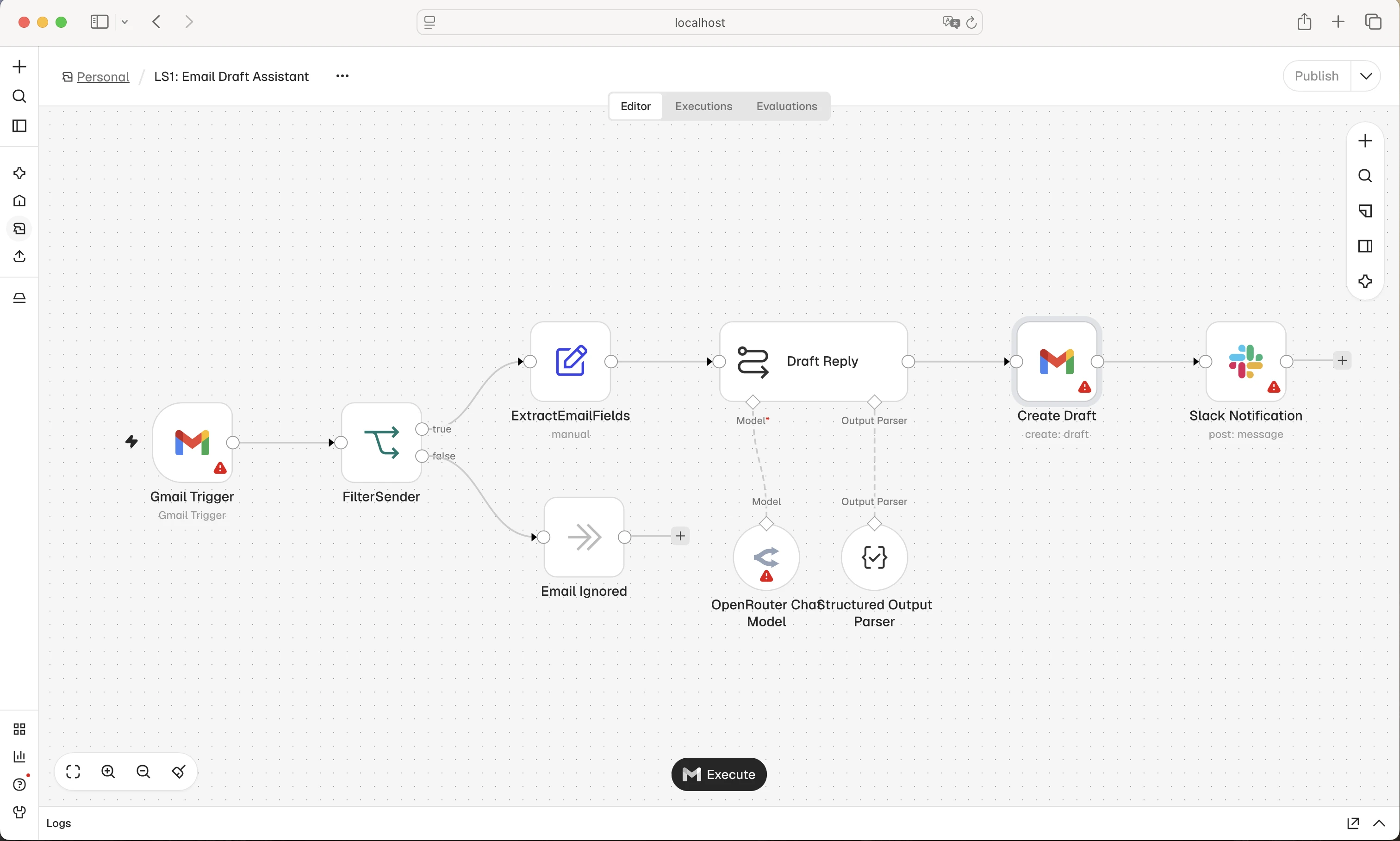
Each box is one step. Follow one test item through the steps to find where it stops or goes down the wrong path. This is n8n’s example workflow.
Screenshot: n8n. Example screen; yours may look different.What to ask the freelancer to do
- Show where the workflow fails
- Fix the agreed steps
- Check missing and repeated items
- Test what happens when an app fails
- Provide the workflow and simple restore instructions
Questions to ask before hiring
- Can you test this with made-up records?
- What happens if the same item arrives twice?
- Does the price include server work?
Red flags
- Runs old customer actions again without checking the effects
- Hides errors and leaves records missing
- Rebuilds everything before finding the fault
Agree what the job includes
- Name the workflow and the problem you want fixed. Ask for a clear reason for the failure before agreeing to replace the whole thing.
- Include records with a missing optional field and records that should be skipped. Check what happens if the same item arrives twice.
- Agree how you will hear about failures and retry them. Server repairs and new features should have their own price.
What to send the freelancer
- Share the workflow name, error text and a made-up example of the expected result. Remove passwords, secret keys and customer details from exports.
- List the connected apps and say whether you host n8n yourself or use n8n Cloud.
- Save the current workflow and agree who can switch the repaired version on.
How to check the work is done
- The agreed examples reach the right apps with the right details.
- A repeat item does not repeat the same business action, such as sending a second reply.
- You receive the repaired workflow, a list of changes and steps for restoring the old version.
What may cost extra
- Building a new workflow or moving hosting is a separate job.
- The freelancer cannot promise that other apps will never fail or change.
Sources checked 22 October 2026
Use this guide to agree the work and check the result.
Common questions
Why does my n8n workflow run manually but not on its own?
A manual run and an automatic run can start in different ways. Check that the workflow is turned on for automatic use and that its trigger receives a fresh test item. Then check its run history.
Does an n8n webhook failure need a new workflow?
Not always. First check where the update stops and whether the receiving step has an error. A repair of the existing workflow may be enough. Rebuilding it should have a clear reason.
Find help on Fiverr
Ready to hand it over? This freelancer offers help with the job covered in this guide. Look at their work and send them your brief to get a quote.
Vladyslav S.
@vlad_stupak · Fiverrn8n workflow repairs
This listing offers help with failed n8n automations and app updates. Ask whether it covers your workflow before ordering.
Before you hire: Ask how they will find the fault, test with made-up records and avoid sending messages twice. Check whether server work costs extra.
View service on Fiverr ↗Listing checked 2026-10-22. We have not hired this freelancer or tested their work.
Build my freelancer brief
Answer a few questions to make a clear job description you can send to a freelancer.