 Tag Manager
 Google Analytics
Server-Side Tagging: Plan the Setup, Cost and Tests
Understand what server-side tracking changes, what it costs and how to test it without counting actions twice.
Server-side tagging sends tracking requests through a server you control before they reach the agreed platforms. It adds another part to maintain. It does not automatically fix bad order data, replace consent choices or recover every missed sale. Start with a clear reason for the change, such as controlling what fields leave your site.
Things to check first
- List the events and platforms already receiving them. Check whether the web setup sends correct order IDs, values and currencies.
- Ask who will own the hosting account and tracking domain. Get an estimate of setup fees and monthly usage costs.
- Find out how the current consent choice reaches the server. Keep rejected choices in your test plan.
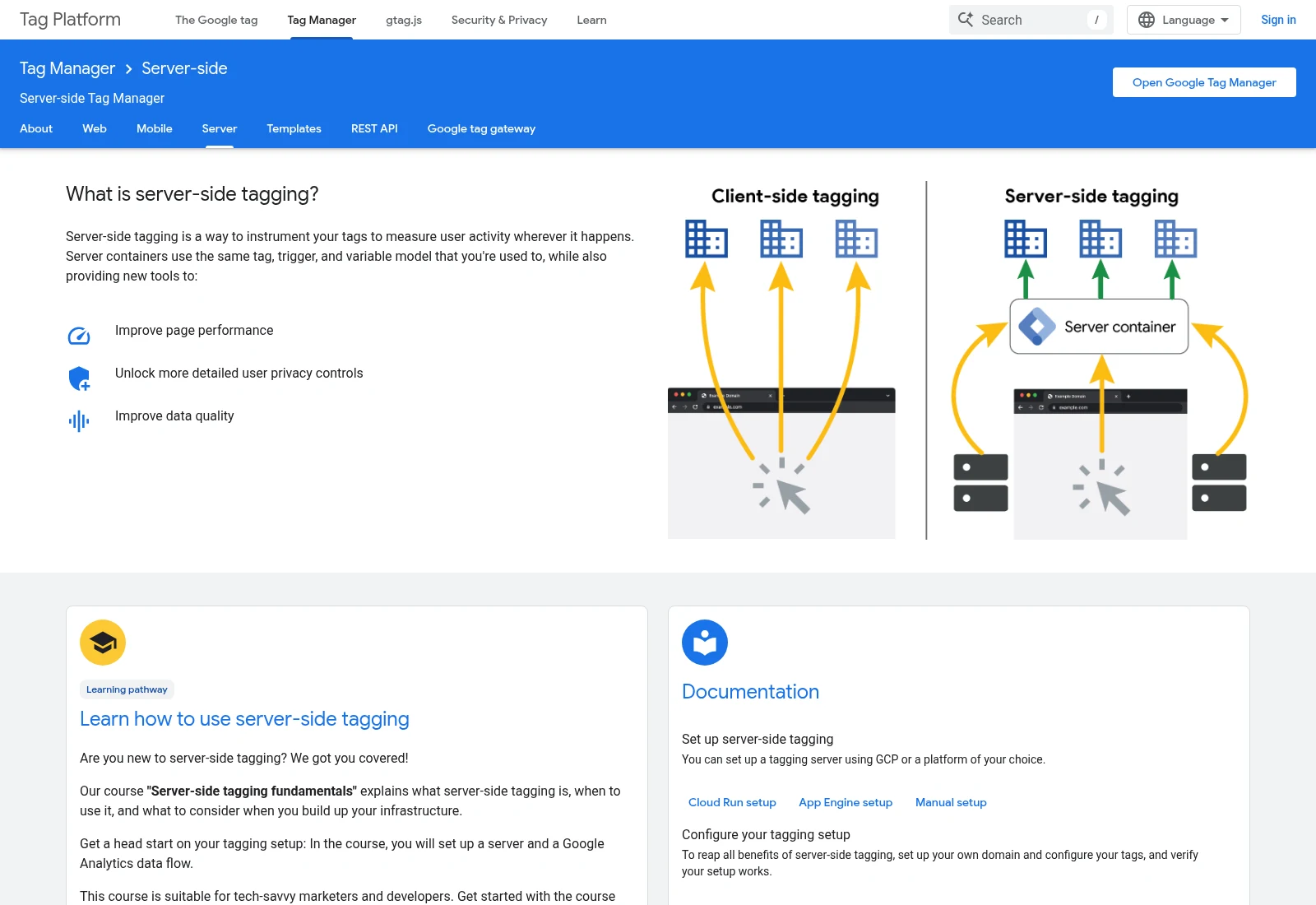
Google’s documentation shows how browser and server tagging routes differ. This diagram is an example, not proof that a live setup respects consent or avoids duplicate events.
Documentation screenshot: Google Tag Manager - Server-side | Google for Developers. Example screen; yours may look different.Follow one event through the whole route
Draw the path from the browser or app to the server container and then to each destination. Some requests may still go straight from the browser. Record both routes so the same purchase is not counted twice.
Choose the fields each destination needs. Do not forward names, email addresses or other private fields just because they are present. Agree what is removed, where logs are kept and who can read them.
Treat hosting as ongoing work
A server container needs an owner after launch. Agree who watches errors, usage and billing, and who updates the setup. A cheap test plan may not cover busy trading periods.
Test accepted and rejected consent choices, a successful action, a failed action and repeated delivery. Compare the receiving tools with the same test record. A rising event count alone does not prove the setup is better.
What to ask the freelancer to do
- Plan the server route and monthly costs
- Configure the agreed tags and consent handling
- Test delivery, duplicates and rollback
Questions to ask before hiring
- Which events still travel directly from the browser?
- How will browser and server events avoid double counting?
- Who handles hosting failures and cost increases after handover?
Red flags
- Promises to recover every sale
- Suggests bypassing a visitor’s consent choice
- Leaves hosting ownership or monthly charges unclear
Agree what the job includes
- Document the existing routes, chosen server host, domain and allowed fields.
- Build the agreed web and server tags with consent handling and duplicate-event checks.
- Test the full route and hand over hosting, costs, monitoring and rollback notes.
What to send the freelancer
- Supply account invitations, current container IDs and a safe test purchase or lead.
- List privacy settings, existing server events and any platform event IDs already in use.
- Agree a spending limit and an owner for the hosting account before deployment.
How to check the work is done
- The agreed test event reaches each intended destination with the correct fields.
- Repeated delivery does not count the same agreed business action twice, and consent tests behave as specified.
- The business controls the host and domain and has clear monthly costs, alerts and rollback steps.
What may cost extra
- Hosting, paid connectors and platform subscriptions are ongoing costs.
- Legal advice, a new consent system and promises to recover all lost data are outside this setup.
Sources checked 2026-10-24
- Google Tag Manager - Server-side | Google for Developers
- Implement consent mode with server-side Tag Manager | Google Tag Manager - Server-side | Google for Developers
Use this guide to agree the work and check the result.
Common questions
Does server-side tracking remove the need for consent?
No. Google’s server-side guidance includes passing consent choices through the setup. A server route is not permission to ignore those choices.
Will server-side tagging fix wrong purchase values?
Not by itself. First fix the source values and event rules. A server can pass on the same wrong data.
Find help on Fiverr
Ready to hand it over? This freelancer offers help with the job covered in this guide. Look at their work and send them your brief to get a quote.
Incisiveranking (Bipin)
@bipinpatel3399 · FiverrServer-side tracking setup
The listing covers server-side tracking for GA4 and advertising platforms. Choose the platforms and hosting route in writing.
Listing checked October 24, 2026: 23 reviews, 5.0/5 displayed. Visible reviews included recent tracking work and repeat projects.
Before you hire: Ask for hosting costs, account ownership, consent handling and browser/server duplicate tests. No setup recovers every missed event.
View service on Fiverr ↗Listing checked 2026-10-24. We have not hired this freelancer or tested their work.
Build my freelancer brief
Answer a few questions to make a clear job description you can send to a freelancer.