 Shopify
Shopify Domain Not Working or Still Pending?
Check the domain’s status, DNS records and security warning without breaking your email. Know when the registrar or Shopify needs to help.
A domain problem can stop the shop opening, send visitors to an old website or show a security warning. Begin with the exact message in Shopify’s domain settings. Check whether the domain is active and whether both the main address and the www address reach the right store. Do not delete all the domain records: some may run your business email and other services.
Things to check first
- Open Shopify’s domain settings and read the issue beside the affected address. Confirm the domain has not expired or been suspended by the company managing it.
- Compare the domain records with the values Shopify currently asks for. Look for duplicate or conflicting records and check the www address separately.
- If you use Cloudflare, review Shopify’s guidance on proxy settings. After a recent change, record the time and allow the stated update period before making repeated changes.
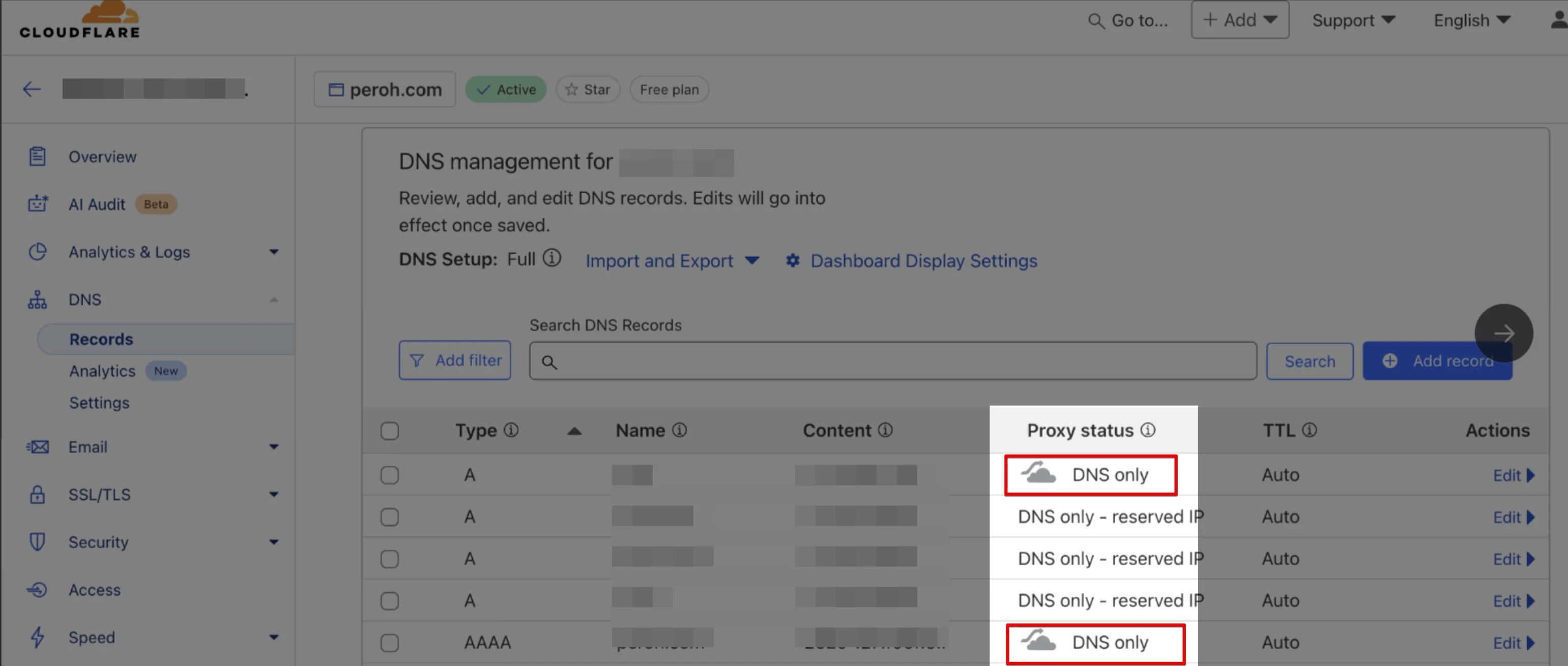
Shopify’s help example of a Cloudflare proxy setting. Compare this with the exact warning for your domain, and preserve records used by business email.
Screenshot: Shopify. Example screen; yours may look different.What to ask the freelancer to do
- Check the domain and exact Shopify warning
- Find conflicting website records
- Connect the agreed addresses safely
- Check secure access and existing email
Questions to ask before hiring
- Which records will change, and which run our email?
- Will you test the main address and www?
- What needs the domain company’s support rather than a settings edit?
Red flags
- Deletes every domain record to start again
- Asks you to buy a new domain without explaining why
- Promises an instant fix for every security warning
Agree what the job includes
- Agree the main store address and any other addresses that should lead to it. Ask the specialist to save the existing records before making changes. Moving the website does not automatically mean moving its email, and an avoidable mailbox outage can be worse than the original fault.
- Check the domain’s current settings and the records visible to visitors. A saved value in the control panel may not yet be the value other systems receive. Record each change and its time, so a delay is not mistaken for a new fault.
- Test secure access to the main address and www, including a direct product link. If a security certificate remains pending after the expected window, keep the evidence and ask the correct provider for help. Do not switch off browser security checks to make the warning look fixed.
What to send the freelancer
- Send the exact domain, Shopify warning and time of the last change. Do not put account passwords or transfer codes in the brief.
- List the domain company, DNS host, email provider and old website host if there was a move.
- Export or screenshot current records and agree a change window. Keep domain ownership and renewal billing in your own account.
How to check the work is done
- The main and www addresses reach the intended Shopify store over a valid secure connection.
- A direct product link works, and agreed email sending and receiving still work after the change.
- You receive a record of changed settings, the primary address and any provider support issue still open.
What may cost extra
- Buying or transferring a domain and moving office email are separate jobs.
- Ownership disputes, provider suspensions and certificate provisioning delays need the relevant company’s help.
Sources checked 2026-10-23
Use this guide to agree the work and check the result.
Common questions
Should I delete old DNS records when connecting Shopify?
Only remove records confirmed to conflict with the website connection. Keep email and other service records unless the specialist has explained and agreed their replacement.
Why does Shopify still show pending after I change the records?
Changes can take time to become visible, and security setup may still be processing. Follow the current Shopify notice, record the change time and avoid repeatedly replacing correct values.
More help: Source 1
Find help on Fiverr
Ready to hand it over? This freelancer offers help with the job covered in this guide. Look at their work and send them your brief to get a quote.
Freelancer F
@freelancerfiver · FiverrConnect an existing domain to Shopify
This listing offers setup of an existing domain for Shopify. Send the domain warning and ask whether the quote covers fixing the current records while keeping your business email working.
Before you hire: Keep domain ownership in your account. Agree the records to change, secure access tests and checks that email still sends and receives.
View service on Fiverr ↗Listing checked 2026-10-23. We have not hired this freelancer or tested their work.
Build my freelancer brief
Answer a few questions to make a clear job description you can send to a freelancer.