 Shopify
 Klaviyo
Klaviyo Not Syncing With Shopify? What to Check
Are Shopify orders, signups or customer details missing from Klaviyo? Check the connection and find someone who can fix the part that is failing.
Shopify and Klaviyo can show as connected while some information still fails to arrive. New orders might be missing, website visits might not appear, or an email may not send even though the details arrived. Work out which part has stopped before replacing the connection. That makes it easier to ask for the right fix.
Things to check first
- Open the Shopify connection settings in Klaviyo. Check for errors and confirm it is connected to the right store.
- Use a test customer to check a recent signup or order. Note exactly which action is missing from their activity list.
- If tracking stopped after a theme change, check the Klaviyo app setting in the new theme using its help guide. Save the old settings before changing them.
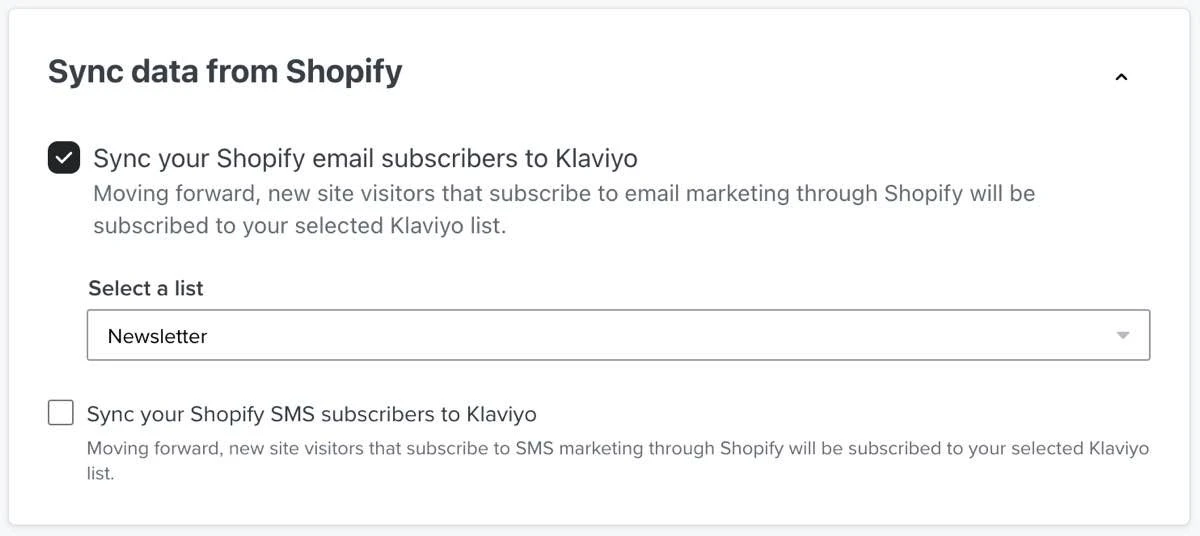
This setting chooses which Klaviyo list receives Shopify email signups. Check that the right list is selected when new subscribers are missing.
Screenshot: Klaviyo. Example screen; yours may look different.What to ask the freelancer to do
- Check the existing connection
- Find missing or repeated customer actions
- Fix the agreed fault
- Test the emails or reports that use the information
Questions to ask before hiring
- Which customer actions will you check?
- How will you prove the information arrived correctly?
- What account access do you need?
Red flags
- Promises a fix without checking what is missing
- Cannot explain how the connection will be tested
Agree what the job includes
- Name the missing information. Is it all orders, only some customers, or one website action?
- Ask the specialist to find the fault in the current setup before adding code or making a new connection.
- Test what happens next. For example, if a signup starts a welcome email, check both the signup and the email.
What to send the freelancer
- Share the store address, missing action and roughly when it stopped. Mention recent app or theme changes.
- Use made-up customers. Keep access keys and customer lists out of your brief.
- List any live email series that use this information. Agree tests that will not send messages to real customers.
How to check the work is done
- The agreed test actions appear in the right Klaviyo account and customer profile.
- The email or report that needs the information receives it, or any remaining limit is clearly explained.
- Ask for a short note explaining which settings changed and how to check the connection later.
What may cost extra
- Writing emails and fixing spam problems are separate jobs.
- Importing customer lists or rebuilding all your email series needs a separate price.
Sources checked 22 October 2026
Use this guide to agree the work and check the result.
Common questions
Does a connected badge mean Shopify and Klaviyo are working properly?
It does not prove every type of information is arriving. Test the specific signup, order or website action that is missing and check the customer’s activity in Klaviyo.
Should I reconnect Klaviyo before checking anything else?
First save the current settings and find what is missing. Reconnecting without knowing the fault may not solve it. Check the help guide or ask support about any clear account error.
Find help on Fiverr
Ready to hand it over? This freelancer offers help with the job covered in this guide. Look at their work and send them your brief to get a quote.
Mudassir B.
@mudassirpro · FiverrShopify and Klaviyo setup
Get your Shopify email setup working with help from Mudassir. His service covers Klaviyo setup, customer groups, signup forms and email flows. Send him the details of what is missing so he can confirm the repair is covered.
Before you hire: Ask him to test an order and a signup, check they reach Klaviyo once, and quote for fixing the existing connection.
View service on Fiverr ↗Listing checked 2026-10-23. We have not hired this freelancer or tested their work.
Build my freelancer brief
Answer a few questions to make a clear job description you can send to a freelancer.