 Shopify
Shopify Payments Not Working? What to Check
Find out whether a Shopify payment problem comes from checkout settings, the payment provider or one customer’s card. Know who can fix it.
A failed payment does not always mean your store needs new code. One buyer’s bank may decline a card while other orders go through normally. A store-wide fault needs a different check. Start by finding whether the buyer reached payment at all. If no delivery option appeared, the problem may be shipping rather than the payment gateway. The gateway is the service that handles the payment. Keep account holds and payment disputes with Shopify or that provider; a freelancer cannot approve your account.
Things to check first
- Open the affected checkout or order history. Note the time, payment method and exact error. Hide the buyer’s details in any screenshot you share.
- Check Settings > Payments for the active provider and any account notice. Confirm whether test mode is on before you try a real purchase.
- Find out whether this affects one buyer, one payment method or everyone. Check the provider’s service status before changing store settings.
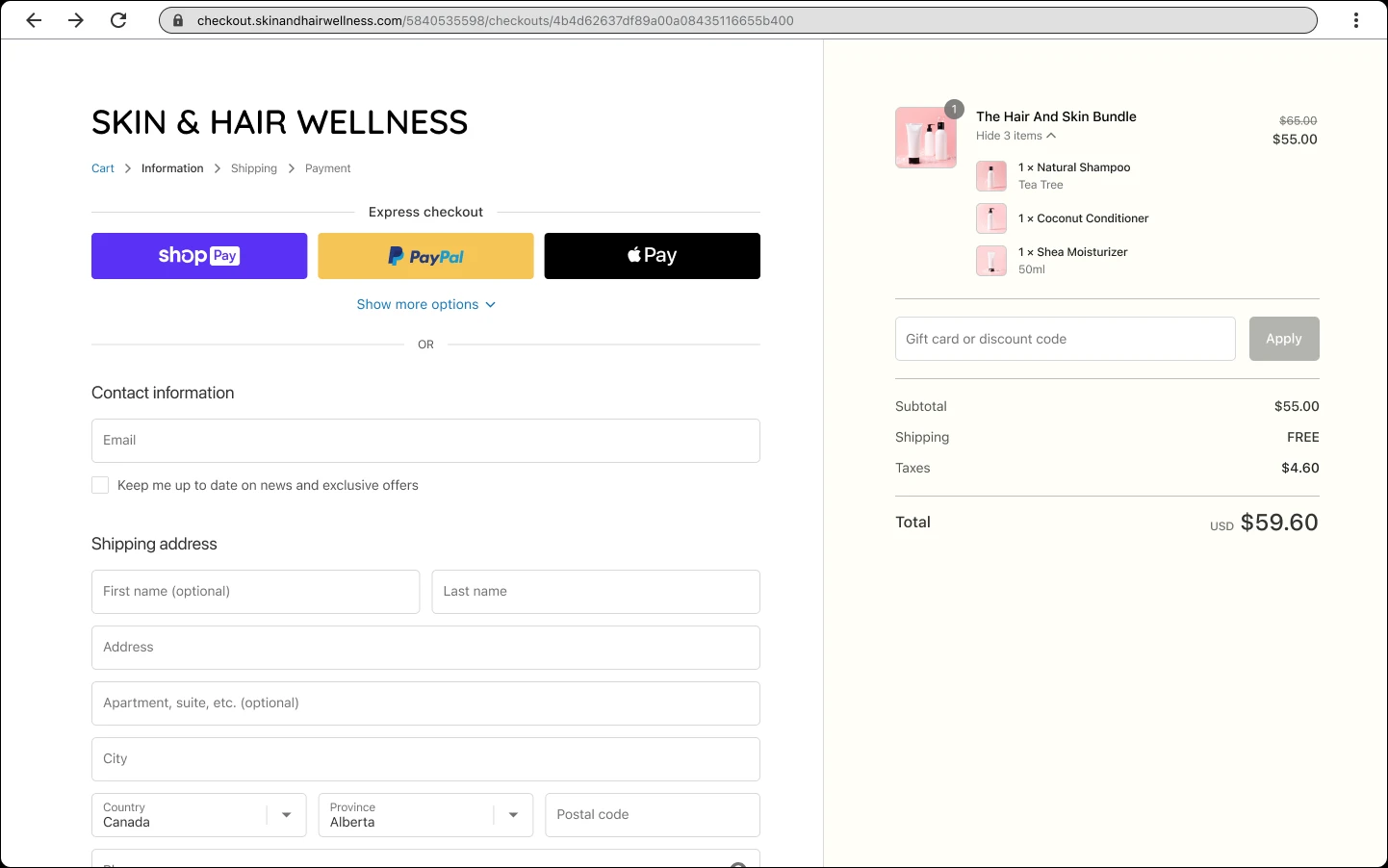
A Shopify checkout example. Write down where the customer gets stuck: before payment, during payment or after returning to the store.
Screenshot: Shopify. Example screen; yours may look different.What to ask the freelancer to do
- Identify the failed payment step
- Check the current provider setup
- Test the agreed methods
- Explain any account issue that needs support
Questions to ask before hiring
- Is this a store fault or a provider restriction?
- Which payment methods and devices will you test?
- How will you check the order after payment?
Red flags
- Promises to remove an account hold
- Asks for full card details
- Switches providers without checking existing orders
Agree what the job includes
- Agree whether the job is to fix an existing provider or connect a new one. Do not bundle account approval into the promise.
- Ask the developer to follow a test checkout from cart to order confirmation. A success screen alone is not enough; the order should show the agreed payment state.
- Keep the old payment settings and agree when changes can go live. If the provider needs to be changed, explain what happens to refunds and existing orders first.
What to send the freelancer
- Share the error, affected method and time, plus recent app or theme changes. Never send card numbers or a customer’s bank statement in a public brief.
- List the provider, store country and whether the problem also appears in a clean browser. Share account notices only through an agreed private channel.
- Agree a test mode or low-value test order, its cost and any refund. The owner should keep control of payment and bank settings.
How to check the work is done
- The agreed payment methods complete the test checkout and show the expected result in the order history.
- A declined test payment leaves a clear result and does not create a false paid order. Repeated clicks do not create an unexplained extra order.
- You receive the changed settings, test results and a clear way to restore the old setup.
What may cost extra
- Provider approval, account holds, chargebacks and bank decisions are outside a developer’s control.
- A new gateway, subscription migration or wider checkout redesign needs its own quote.
Sources checked 23 October 2026
Use this guide to agree the work and check the result.
Common questions
Can a developer fix a Shopify Payments account hold?
The account owner needs to follow Shopify’s notice and support process. A developer can help gather evidence or fix store code, but cannot lift a provider restriction.
What if the customer says they paid but there is no order?
Check the order and checkout history, then contact the payment provider with the time and amount through a private support channel. Do not keep asking the customer to pay again before the first attempt is understood.
Find help on Fiverr
Ready to hand it over? This freelancer offers help with the job covered in this guide. Look at their work and send them your brief to get a quote.
Horlah M
@ecom_horlah · FiverrSet up or fix Shopify payments
Horlah offers Shopify payment setup and help with checkout errors or missing payment methods. The listing covers Shopify Payments, PayPal and supported third-party providers. Send the error message and your store details so he can check what needs fixing.
Before you hire: Ask which payment methods your country and business can use, what the quote covers, and how checkout will be tested. Account approval and payment holds still need the provider’s support.
View service on Fiverr ↗Listing checked 2026-10-23. We have not hired this freelancer or tested their work.
Build my freelancer brief
Answer a few questions to make a clear job description you can send to a freelancer.