 Zapier
Need a Zapier Workflow? Plan the Steps Before You Hire
Turn a repeated business task into a clear Zapier job. Agree the trigger, field rules, test records and handover before someone starts building.
Suppose a new enquiry should create a CRM contact, tell the right salesperson and add a follow-up task. Those are three results, not simply 'connect my apps'. Zapier calls the event that starts the work a trigger. The later steps are actions. Write down the result you want at each step so the freelancer can choose supported actions and quote the actual work.
Things to check first
- Check whether your apps already have a supported connection and the exact trigger and action you need. A listed app does not mean every feature or record type is available.
- Write down the fields needed in the destination. Include what should happen when a phone number is blank, an enquiry already exists or a person opts out of messages.
- Check the plans and permissions in Zapier and both apps. Ask how often the trigger checks for new records and what each run may cost. Do not assume every trigger runs instantly.
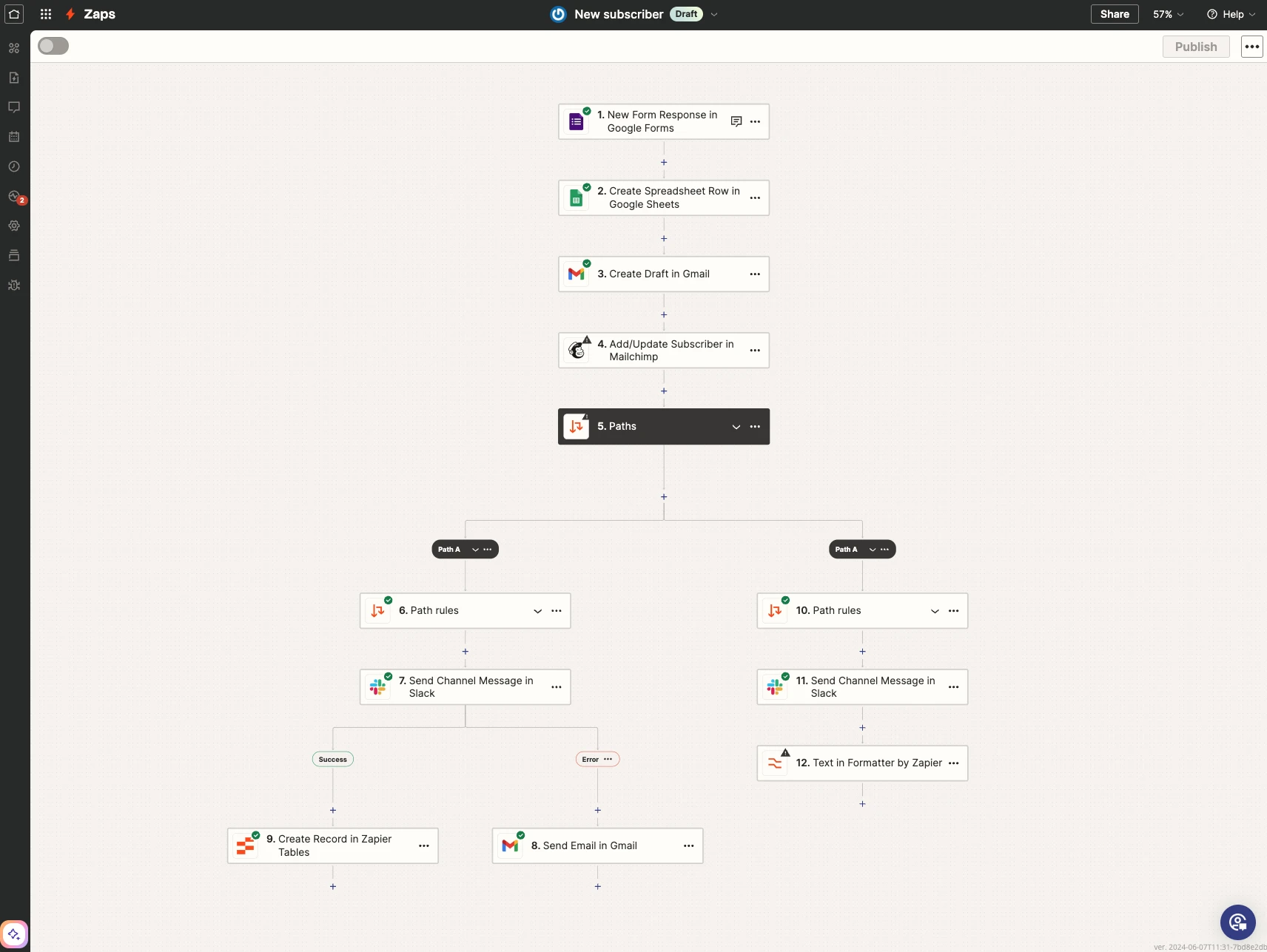
A trigger starts the Zap and each action does part of the job. This is Zapier’s example, not a completed workflow for your business. Test a fresh item after publishing.
Screenshot: Zapier. Example screen; yours may look different.What to ask the freelancer to do
- Map the trigger, actions and field rules
- Build the agreed Zap with test records
- Check a fresh item in the published version
- Hand over usage, ownership and recovery steps
Questions to ask before hiring
- Is the exact action supported by the app connection?
- How will you find and update an existing record?
- What happens when an app is unavailable or a run repeats?
Red flags
- Quotes only from app names without asking what should happen
- Tests with real customer email or payment actions
- Leaves ownership and failed-run checks unclear
Agree what the job includes
- Draw the route from the trigger to the final result. State which app controls each field and how existing records are found. Updating a contact is different from making a new contact every time the trigger runs.
- Build with made-up records and review the data at each step. Zapier warns that action tests can change connected apps. Use a separate destination or controlled test record, with real customer messages blocked.
- Publish the agreed version and test a fresh item from the actual source. A sample loaded into the editor does not prove the live trigger starts correctly. Agree how failed runs are found, retried and checked without sending the same message twice.
What to send the freelancer
- Send the apps, required results and field names. Include two or three made-up examples, including an incomplete record.
- Invite the freelancer to the right accounts using the access the tools support. Keep passwords and keys out of the project brief.
- Agree the expected run volume, paid-plan costs and who will own the Zap when the work is finished. Save the old process while the new one is tested.
How to check the work is done
- A new test item starts the published Zap and reaches the right destination with the agreed fields and owner.
- A repeated item, missing field and temporary app failure follow the agreed rules. Recovering a failed run does not repeat a completed business action.
- You receive a workflow map, test results, expected usage costs and simple steps to pause, inspect and recover the Zap.
What may cost extra
- Moving historical records, cleaning a CRM and adding unsupported app actions are separate jobs.
- Subscription fees and a promise of instant delivery are not included unless the quoted tools and trigger support them.
Sources checked 23 October 2026
Use this guide to agree the work and check the result.
Common questions
Can Zapier connect any two apps?
It depends on their supported actions, access and APIs. A native connection may cover the task; a custom request may be needed for something else. Confirm the exact operation before commissioning a build.
Why test again after the editor test passes?
The editor can use a selected sample. A fresh item checks the real trigger, published version and destination together. That can reveal missing fields or timing differences the sample did not show.
Find help on Fiverr
Ready to hand it over? This freelancer offers help with the job covered in this guide. Look at their work and send them your brief to get a quote.
Sam
@abdus_s · FiverrNew Zapier workflow build
This listing includes new Zapier workflows, app connections, testing and handover. Packages limit apps and actions; custom requests and more complex logic need the right scope.
The listing showed 1,169 reviews when checked. Reviews cover a range of jobs; we have not independently tested this seller's work.
Before you hire: Send your trigger, final result and field examples. Ask about task costs, repeated records and the fresh test after publishing.
View service on Fiverr ↗Listing checked 2026-10-23. We have not hired this freelancer or tested their work.
Build my freelancer brief
Answer a few questions to make a clear job description you can send to a freelancer.