 WooCommerce
How to Set Up WooCommerce Subscriptions and Test Renewals
Plan recurring WooCommerce orders, check payment support and test what happens after the first purchase.
A recurring product needs to work next month as well as today. The first payment can succeed while a renewal fails because a payment method, scheduled task or customer setting was missed. Choose your subscription extension and payment provider together. This guide uses WooCommerce Subscriptions as the example; another extension may have different controls. Write down what should happen when a payment fails, a customer cancels or a product becomes unavailable.
Things to check first
- List the billing price, interval, shipping rules and any trial. Keep the first setup simple enough to test every promised option.
- Check the extension and payment provider’s support for automatic renewals. A method that accepts one-off payments may not support recurring charges.
- Confirm where customers will manage their plan and how staff will see failed or overdue renewals. Use a private test copy that cannot accidentally charge real subscribers.
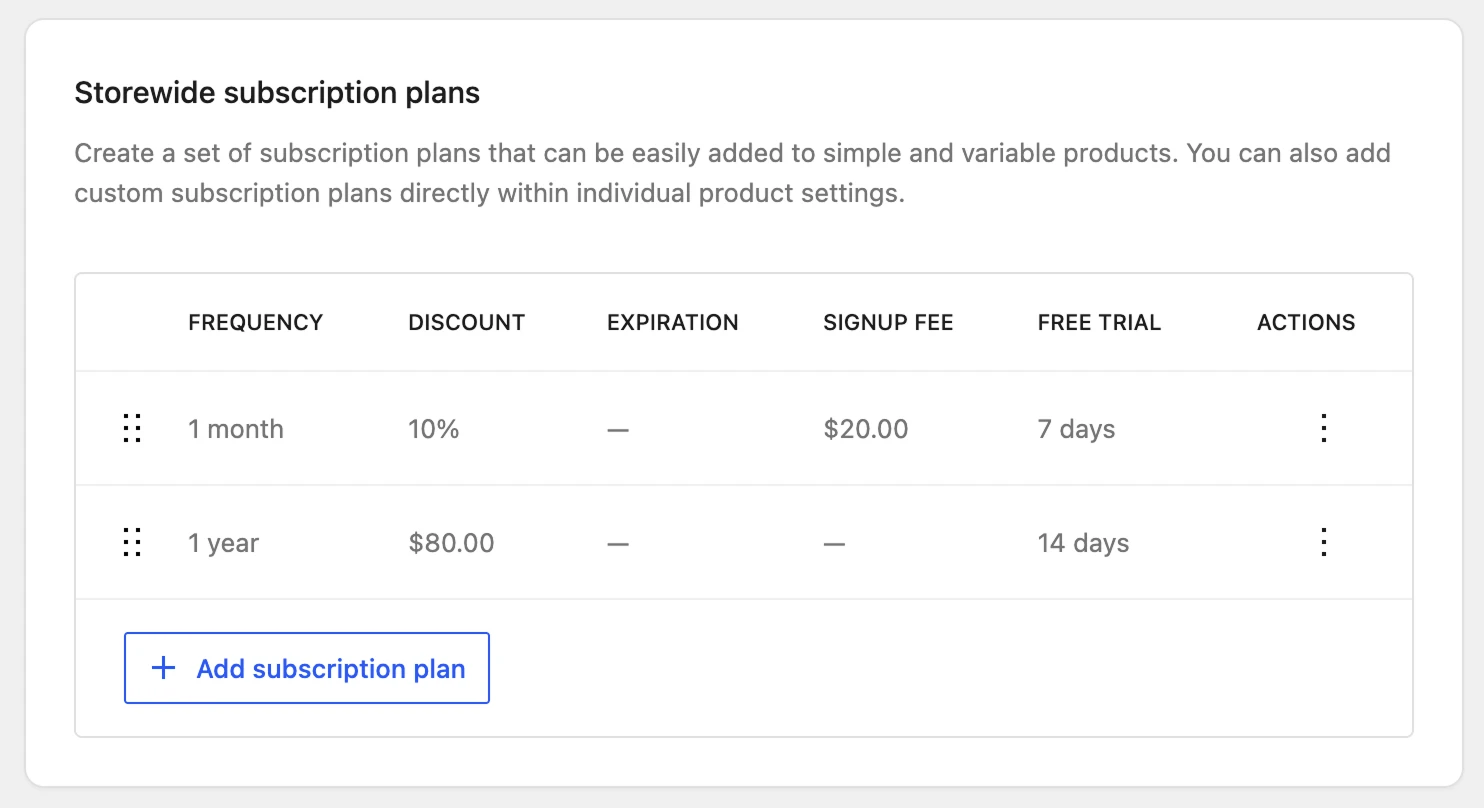
WooCommerce’s example of reusable subscription plans. Check the billing interval, price and customer options for your own extension version.
Screenshot: WooCommerce. Example screen; yours may look different.What to ask the freelancer to do
- Configure the agreed recurring plans
- Check payment support for renewals
- Test the full subscription cycle
- Explain staff checks and ongoing costs
Questions to ask before hiring
- Which payment methods renew automatically?
- How will you prove a later renewal works?
- Who is alerted when a payment fails?
Red flags
- Tests only sign-up
- Uses live customer subscriptions for experiments
- Assumes all gateways support the same recurring features
Agree what the job includes
- Agree the extension, plans and exact customer actions included. State whether renewals are automatic or require the customer to return and pay.
- Test the first order, a later renewal, a failed renewal and cancellation. The plan should explain how test timing works without altering real customer billing.
- Check the scheduled background tasks that drive the setup and who notices failures. Do not solve late renewals by repeatedly running unknown live payment tasks.
What to send the freelancer
- Send the product examples, payment provider and billing rules. List existing subscribers if this is a move or replacement.
- Agree a private test setup, test payment method and a way to disable real emails and charges there.
- Name the person responsible for subscription support and licence renewals. Confirm what should happen to order handling after a cancellation or failed payment.
How to check the work is done
- The test customer sees the agreed upfront and recurring charges and can find the promised account controls.
- A renewal creates the expected order once. Failed payment and cancellation tests produce the agreed status and staff action.
- You receive a short guide for checking scheduled tasks, handling failures and maintaining the extension.
What may cost extra
- Moving active billing agreements from another system is a separate project.
- Extension fees, payment-provider decisions and writing subscription terms are outside the basic technical setup.
Sources checked 23 October 2026
Use this guide to agree the work and check the result.
Common questions
Is a successful first payment proof that renewals work?
No. Test the renewal process separately, including the background task and the resulting order. Also test what staff see when payment fails.
Do all WooCommerce subscriptions charge automatically?
No. That depends on the extension, gateway and plan setup. Some use manual renewal, where the customer returns to pay. Agree the intended behavior before building it.
More help: Source 1
Find help on Fiverr
Ready to hand it over? This freelancer offers help with the job covered in this guide. Look at their work and send them your brief to get a quote.
Muneeb Jutt
@muneebjutt531 · FiverrSet up WooCommerce subscriptions
Muneeb offers WooCommerce subscription products and repeat billing with a compatible plugin and payment provider. His packages cover one product through to a larger subscription range, with checkout checks and handover notes. Send your products and billing rules for a quote.
Before you hire: Confirm plugin costs, automatic renewal support and the number of products included. Ask for tests of an order, a renewal and a cancellation. Moving existing subscriptions is a separate job.
View service on Fiverr ↗Listing checked 2026-10-23. We have not hired this freelancer or tested their work.
Build my freelancer brief
Answer a few questions to make a clear job description you can send to a freelancer.